Secure Real-Time Data Access for Enterprise AI Agents
Finally, a solution that enables AI innovation without compromising enterprise security.
As an enterprise infrastructure leader with 12+ years of experience designing and implementing cloud platforms for Fortune 500 companies, I’ve led teams that built multi-cloud data lakes processing 10TB/day and deployed 10+ GenAI applications with proper security governance. During this journey, I encountered a critical challenge that every enterprise faces today:
How do you give AI agents real-time access to sensitive enterprise data while maintaining zero trust security principles?
Most organizations are stuck between two unacceptable options:
Block AI initiatives due to security concerns (stifling innovation)
Create insecure data pipelines that bypass security controls (creating massive risk)
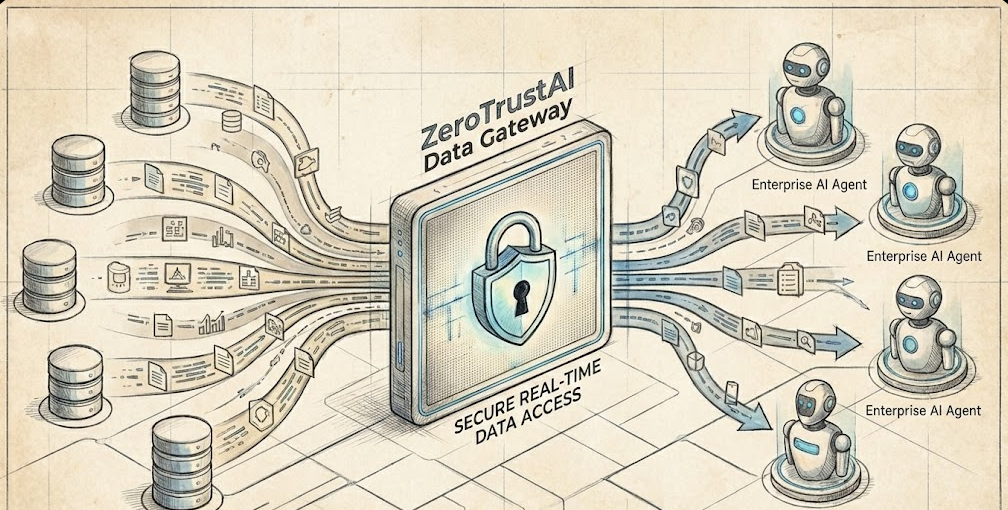
Today, I’m excited to announce ZeroTrustAI Data Gateway – the world’s first secure data access platform built specifically for AI agents operating in enterprise environments.
The Enterprise AI Security Challenge
Why Traditional Approaches Fail
Traditional API gateways and data governance tools weren’t designed for AI workloads. They lack the granular, context-aware access controls needed for AI agents that:
Query data dynamically based on user requests
Access multiple data sources simultaneously
Require real-time responses for interactive applications
Operate autonomously without human intervention
In enterprise environments, we’ve seen teams building custom, insecure data pipelines just to get their AI projects off the ground. Security teams are forced to choose between enabling innovation or protecting data.
The Zero Trust Imperative
With regulations like GDPR, HIPAA, and SOC2 becoming more stringent, enterprises can’t afford data breaches. Zero trust architecture – never trust, always verify – is no longer optional. But implementing zero trust for AI agents requires a fundamentally different approach.
Introducing ZeroTrustAI Data Gateway
ZeroTrustAI Data Gateway is a secure middleware platform that provides AI agents with controlled, audited, real-time access to enterprise data sources while maintaining zero trust security principles from day one.
Built by Enterprise Practitioners, for Enterprise Needs
Unlike theoretical solutions, ZeroTrustAI Data Gateway is built on real-world experience scaling AI infrastructure at enterprise scale:
✅ 10TB/day data lake operations at Fortune 500 scale
✅ 100+ ML applications managed through Kubeflow
✅ Multi-cloud deployments across Azure, GCP, and AWS
✅ 40% cost optimization while maintaining 99.9% uptime
✅ GDPR-compliant AI implementations with proper governance
Core Capabilities
Zero Trust Policy Engine
Attribute-based access control (ABAC) for AI agents
Real-time policy evaluation with millisecond latency
Dynamic policy updates based on context and risk
Integration with existing IAM (Azure AD, Google Workspace, Okta)
Data Warehouses: Snowflake, BigQuery, Redshift, Azure Synapse
Vector Databases: Pinecone, Weaviate, Milvus
APIs: REST, GraphQL, gRPC
File Systems: S3, Azure Blob, GCS
AI Agent Registry
Agent identity management with cryptographic verification
Capability-based permissions (not just role-based)
Reputation scoring based on behavior analytics
SDK integration with LangChain, LlamaIndex, Semantic Kernel
Audit & Compliance
Complete audit trail of all data access events
Real-time anomaly detection for suspicious activity
Compliance reporting for GDPR, HIPAA, SOC2
SIEM integration for centralized security monitoring
Two Deployment Options for Every Enterprise
We understand that one size doesn’t fit all. That’s why ZeroTrustAI Data Gateway comes in two deployment models:
SaaS Platform (ZeroTrustAI Cloud)
Perfect for mid-market companies and teams wanting to get started quickly:
Fully managed service hosted on our secure Azure platform
Multi-tenant architecture with complete tenant isolation
Pay-as-you-go pricing starting at €2,000/month
Immediate availability – deploy in minutes, not months
Self-Hosted Kubernetes
Ideal for large enterprises with strict data residency requirements:
Deploy in your own Kubernetes clusters (on-premises or cloud)
Single-tenant architecture with full data control
Helm chart deployment for easy installation
Enterprise licensing with dedicated support
Real-World Use Cases
Financial Services: Secure AI for Fraud Detection
A major European bank uses ZeroTrustAI Data Gateway to enable their fraud detection AI agents to access real-time transaction data while maintaining PCI-DSS compliance. The result: 30% faster fraud detection with zero security incidents.
Healthcare: HIPAA-Compliant Patient Care AI
A hospital system implements ZeroTrustAI Data Gateway to allow their patient care AI to access electronic health records while maintaining strict HIPAA compliance. Patient outcomes improved by 15% while achieving full audit compliance.
Logistics: Real-Time Supply Chain Optimization
Logistics companies use ZeroTrustAI Data Gateway to enable AI agents to access shipment tracking, inventory, and weather data in real-time. Supply chain efficiency improved by 25% with complete data security.
Why Enterprises Choose ZeroTrustAI
✅ Security First, Always
Zero trust by design – not retrofitted security
End-to-end encryption for all data in transit and at rest
Automatic data masking for sensitive information
Continuous monitoring and threat detection
⚡ Performance Optimized
Sub-50ms latency for real-time AI applications
Horizontal scaling to handle enterprise workloads
Efficient resource usage – minimal CPU and memory overhead
Caching strategies to reduce database load
🛠️ Developer Friendly
Simple SDK integration with popular AI frameworks
Comprehensive documentation and examples
Terraform provider for infrastructure as code
Kubernetes operator for cloud-native deployments
💼 Enterprise Ready
SOC2 Type II compliance (in progress)
GDPR and HIPAA ready architecture
24/7 enterprise support with SLA
Professional services for complex deployments
Get Started Today
Free Security Assessment
We offer a free 30-minute security assessment to evaluate your current AI data access patterns and identify potential risks. Our team will provide specific recommendations for implementing zero trust security for your AI initiatives.
Pilot Program
Join our enterprise pilot program to deploy ZeroTrustAI Data Gateway in your environment with dedicated support from our team. Pilot customers receive 6 months free and direct access to our engineering team.
Contact Us
Ready to secure your AI data access? Contact us today for a personalized demo and pricing discussion.
Your All‑In‑One Baby Tracker and Virtual Nanny for Calm, Confident Parenting
The first months with a baby are magical — and exhausting. Between feeding schedules, sleepless nights, doctor appointments, and remembering who last changed the diaper, it’s easy to feel overwhelmed.
Baby Care AI is designed to take the mental load off your shoulders.
This AI-powered baby tracking and management app brings everything you need into one simple, beautiful experience — so you can stop juggling spreadsheets, notes, and multiple apps, and focus on what matters most: enjoying time with your baby.
Available on Web, iOS, and Android, Baby Care AI keeps everything synced in real time across all your devices, with enterprise-grade security protecting your family’s data.
🌟 Why Parents Love Baby Care AI
Instead of just tracking data, Baby Care AI helps you make better decisions, spot patterns early, and feel more in control.
All your baby’s info in one place – feeding, sleep, growth, milestones, notes, appointments, shopping lists, and more
AI-powered Virtual Nanny – ask questions any time, get personalized, context-aware answers
Smart daily planning – get tailored suggestions for feeding, sleep, and activities
Real-time sync for both parents – everyone stays on the same page, always
Beautiful dashboards – see trends at a glance instead of digging through logs
Serious about privacy – built with enterprise-grade authentication and encryption
📱 What You Can Do with Baby Care AI
🍼 Effortless Feeding Tracking
Never guess again when your baby last ate or how much.
Log bottle feeds with exact volumes (in milliliters)
Track spit-up and see net intake automatically
View feeding history and spot patterns over days and weeks
See daily and weekly statistics at a glance
Use time-stamped records to discuss feeding with your pediatrician
Benefit: Quickly see if your baby is drinking enough, detect changes early, and walk into doctor visits with clear, organized data instead of guesswork.
🤱 Breastfeeding & Pumping, Without the Mental Math
Support breastfeeding with simple, flexible tracking.
Time direct breastfeeding sessions (by minutes and side)
Log pumping sessions and pumped volume
Track feeding duration and trends over time
Automatically integrate breastfeeding and pumping into your overall feeding analytics
Benefit: Understand your feeding rhythm, support your milk supply, and confidently track both pumped and direct feeds in one unified view.
😴 Understand (and Improve) Your Baby’s Sleep
Sleep feels random — until you see the patterns.
Track start and end times for every sleep session
See total hours slept per day
Follow sleep duration trends and 7-day history charts
Visualize sleep patterns to understand wake windows and overtiredness
Get sleep quality insights based on your logs
Benefit: Make informed adjustments to naps and bedtime routines instead of relying on guesswork or conflicting advice.
🍎 Solid Food & Nutrition Tracking
When solids enter the picture, things get more complex. Baby Care AI keeps it simple and structured.
Log solid meals with food type and time
Track calories and intake over the day
Follow nutritional patterns and feeding milestones
Review meal history to spot reactions or preferences
Benefit: Confidently introduce solids, monitor how much your baby is really eating, and build a record you can review with healthcare professionals.
📊 Weight & Growth Tracking That Actually Makes Sense
No more trying to remember percentiles from a rushed doctor visit.
Record weight entries and track from birth weight onward
See growth curves and percentiles visualized over time
Review historical growth data in seconds
Pair growth with feeding and sleep patterns to see the full picture
Benefit: Quickly spot deviations, discuss them clearly with your pediatrician, and feel reassured by seeing your baby’s growth journey in context.
🎯 Developmental Milestones, Celebrated and Organized
Track your baby’s milestones without losing them in a notebook or chat history.
Web app hosted in Western Europe (WEU). Android link opens the Play Store testing track; iOS link opens the App Store (app: Baby Care AI, bundle: com.babycareai.app).
All platforms stay perfectly in sync in real time, so you can start a log on your phone and finish it on your laptop without missing anything.
🔒 Built for Privacy, Security, and Peace of Mind
Your baby’s data is deeply personal. Baby Care AI treats it that way.
Enterprise-grade authentication with Microsoft Entra ID (Azure AD)
Secure API access using modern token standards
End-to-end HTTPS encryption for all data in transit
Data encryption at rest in the cloud
Role-based access control to manage who can see what
Designed with privacy regulations and best practices in mind
Benefit: Enjoy the same level of security used in modern enterprises, tailored to the needs of your family.
🚀 Get Started with Baby Care AI Today
Join thousands of parents who use Baby Care AI to feel more organized, more informed, and more confident every day.
Track feeding, sleep, growth, milestones, and more in one place
Get AI-powered support whenever questions come up
Share responsibilities seamlessly with partners and caregivers
Keep your baby’s data secure, structured, and always accessible
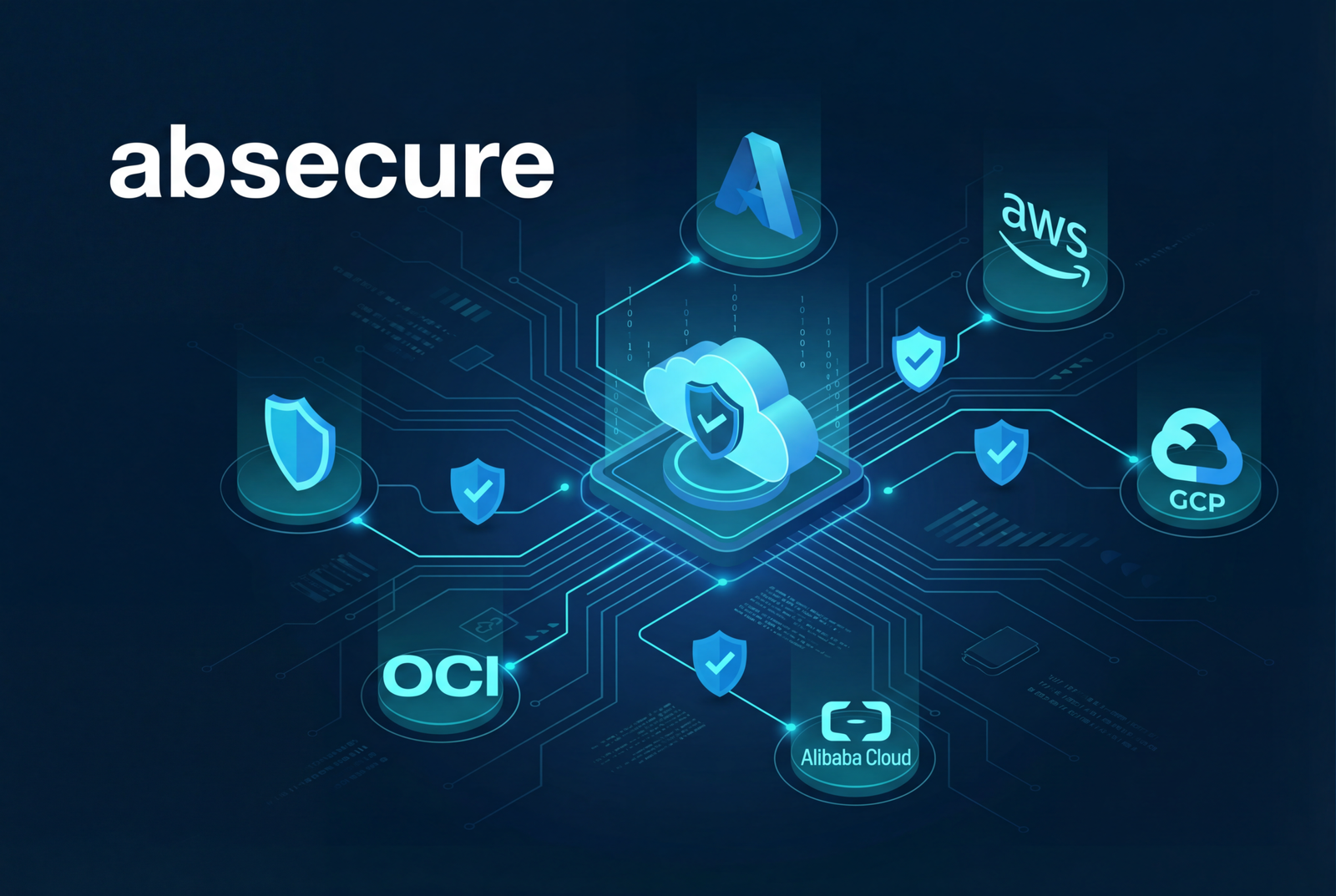
Secure Your Multi-Cloud Infrastructure with absecure: The Complete Security Team , not just a tool
26 Dec 2025
By Juan M
Technology
The Cloud Security Crisis: Why 82% of Breaches Start with Misconfiguration
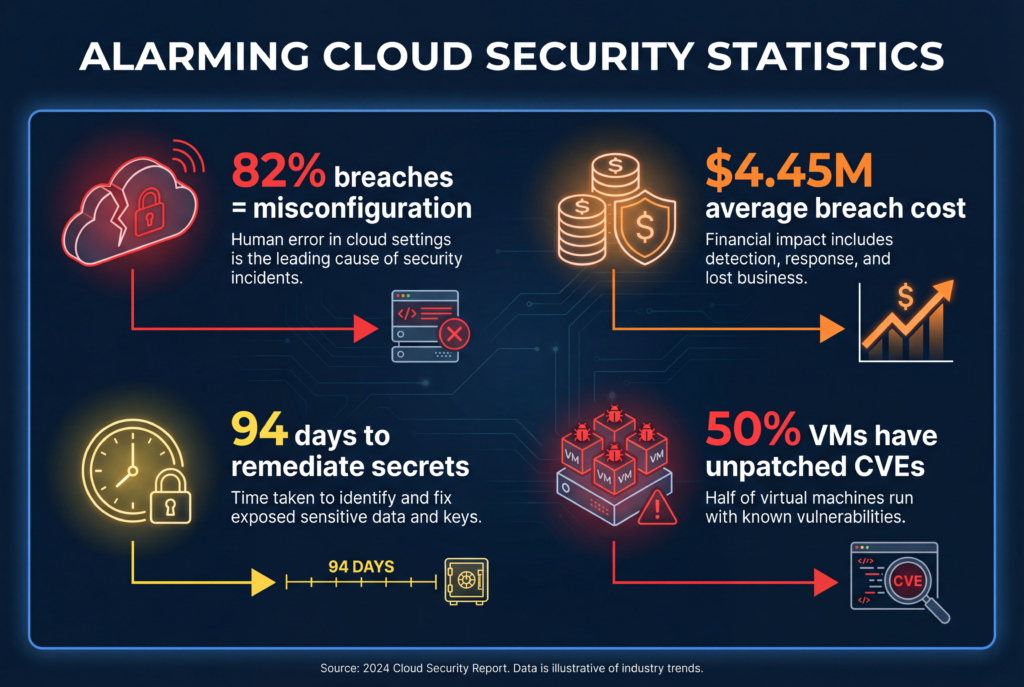
In today’s multi-cloud world, organizations face an unprecedented security challenge. According to recent industry reports, 82% of cloud breaches are caused by misconfigurations—open S3 buckets, exposed databases, hardcoded credentials, and improperly configured access controls. With 78% of enterprises using three or more cloud providers, security teams are struggling to maintain visibility and control across their entire infrastructure.
The numbers are staggering:
50% of VMs have unpatched critical CVEs (CVSS 9+)
94 days average time to remediate leaked secrets
$4.45M average cost of a data breach
Traditional security tools fall short because they’re built for single-cloud environments or require expensive agents on every resource. Security teams are drowning in alerts, spending countless hours on manual reviews, and struggling to keep up with the pace of cloud deployments.
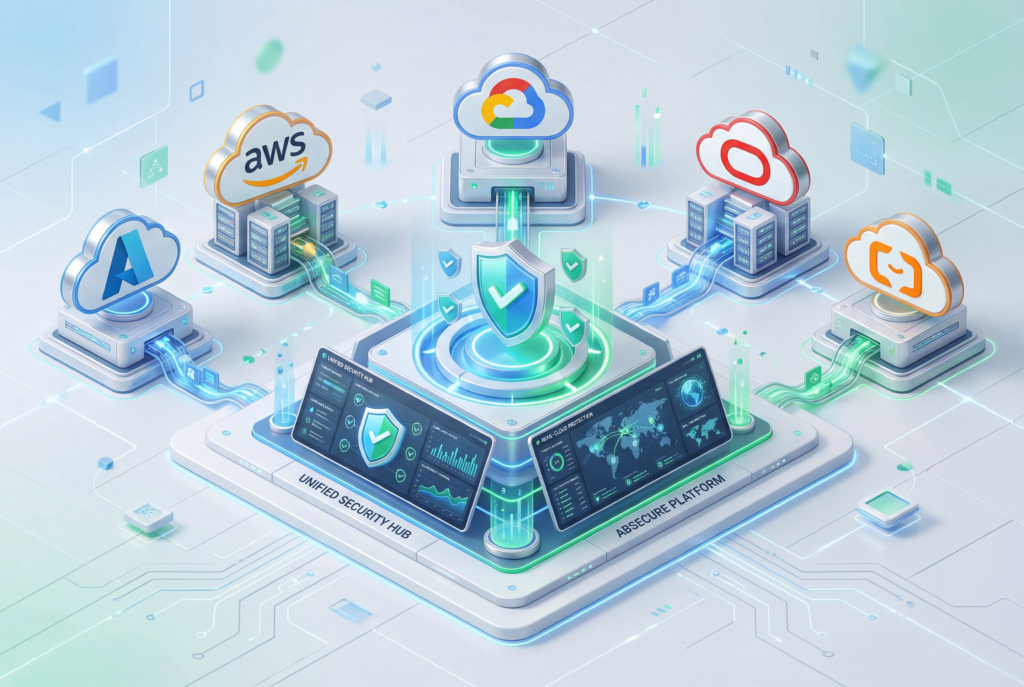
absecure is the next-generation Cloud Security Posture Management (CSPM) platform designed from the ground up for multi-cloud environments. We’ve built a comprehensive solution that combines real-time vulnerability detection, automated remediation, AI-powered threat analysis, and compliance automation—all in one unified platform.
Why absecure is Different
Unlike legacy CSPM tools that focus on a single cloud or require complex agent deployments, absecure offers:
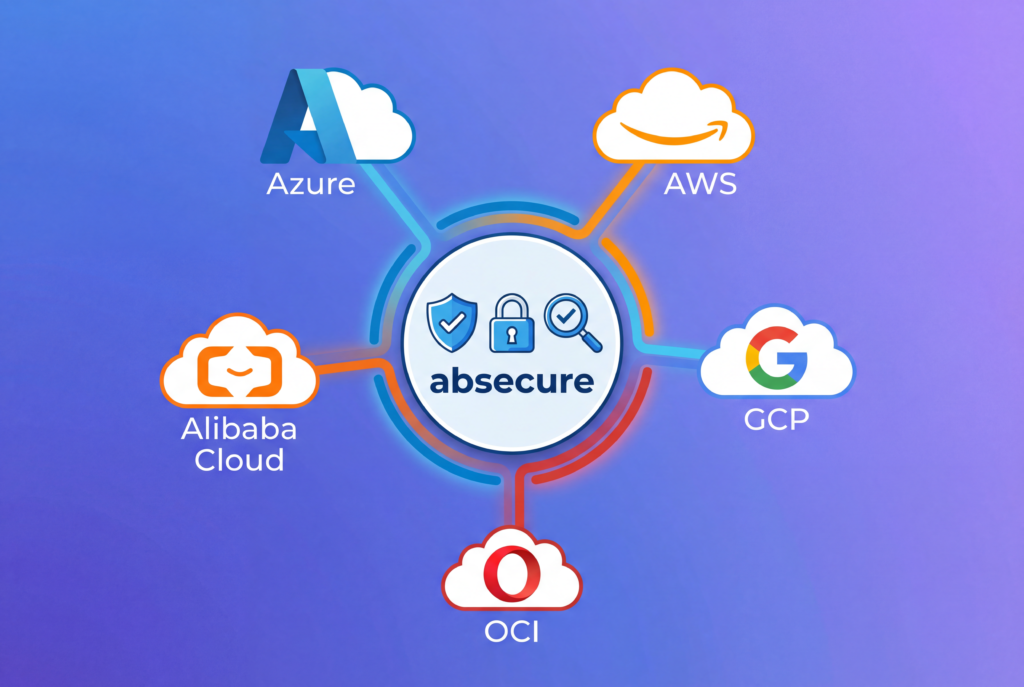
True Multi-Cloud Native: Native integration with Azure, AWS, GCP, OCI, and Alibaba Cloud from day one
Agentless Architecture: No agents required—scan and secure your infrastructure without deployment overhead
AI-Powered Detection: Machine learning algorithms detect zero-day threats and anomalies that traditional rule-based systems miss
Automated Remediation: Fix security issues in 60 seconds with approval workflows and automatic rollback
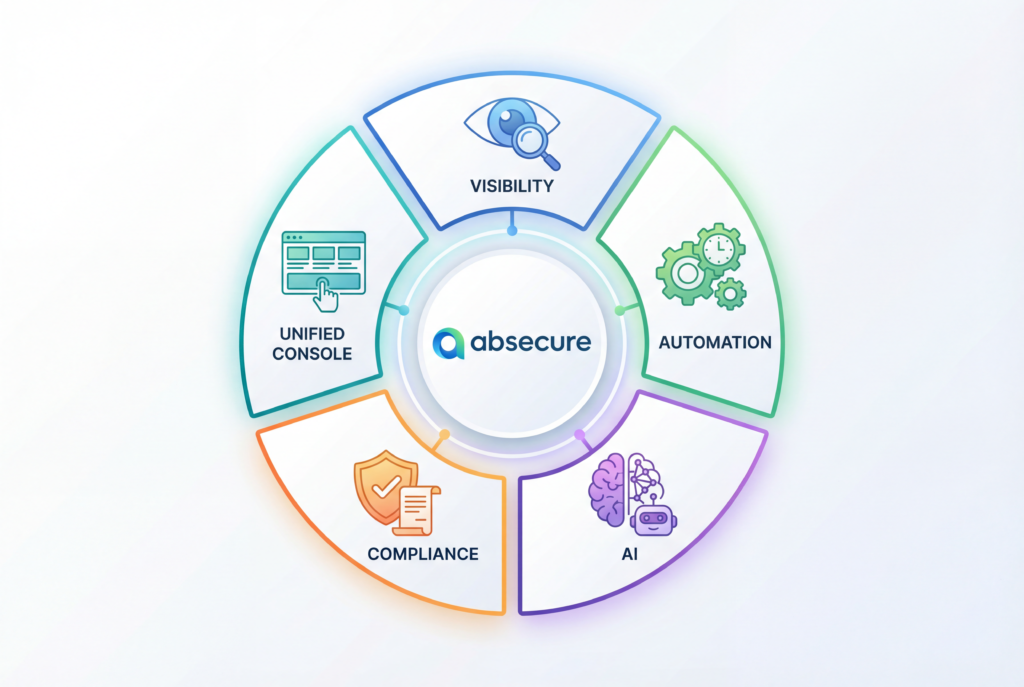
Unified Console: One dashboard to manage security across all your cloud providers
Core Security Capabilities
🔍 Comprehensive Vulnerability Detection
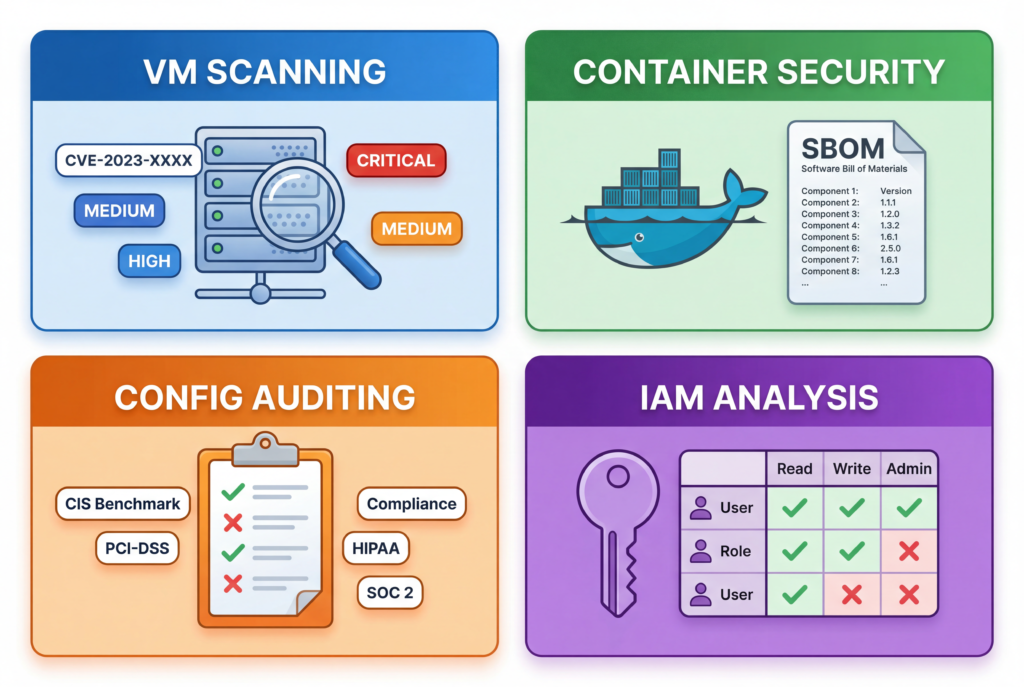
absecure provides deep visibility into your cloud infrastructure with four core detection capabilities:
1. VM & Host Scanning
CVE Detection: Continuous scanning against the NVD database for known vulnerabilities
Kernel Vulnerability Detection: Identify kernel-level security issues that could lead to privilege escalation
End-of-Life OS Detection: Automatically flag operating systems that no longer receive security updates
Package Vulnerability Analysis: Scan installed packages for known CVEs and recommend updates
2. Container Security
Base Image Scanning: Analyze container images for vulnerabilities before deployment
SBOM Generation: Generate Software Bill of Materials (SPDX format) for compliance and supply chain security
Malware Detection: Identify malicious code in container layers
Secret Scanning: Detect hardcoded credentials and API keys in container images
Runtime Threat Detection: Monitor running containers for suspicious behavior
3. Configuration Auditing
Multi-Framework Compliance: Automated checks against CIS, NIST, PCI-DSS, HIPAA, SOC2, and ISO27001 benchmarks
Misconfiguration Detection: Identify exposed APIs, public storage buckets, unencrypted databases, and other risky configurations
Policy Engine: Custom policy creation using Rego/OPA for organization-specific requirements
Real-Time Monitoring: Continuous monitoring of configuration changes
4. IAM Analysis
Permission Analysis: Detect excessive permissions, wildcard policies, and admin access
Service Account Abuse: Identify misused or over-privileged service accounts
Unused Role Detection: Find and recommend removal of unused IAM roles
Access Recommendations: AI-powered suggestions for least-privilege access
⚡ Automated Remediation: Fix Issues in 60 Seconds
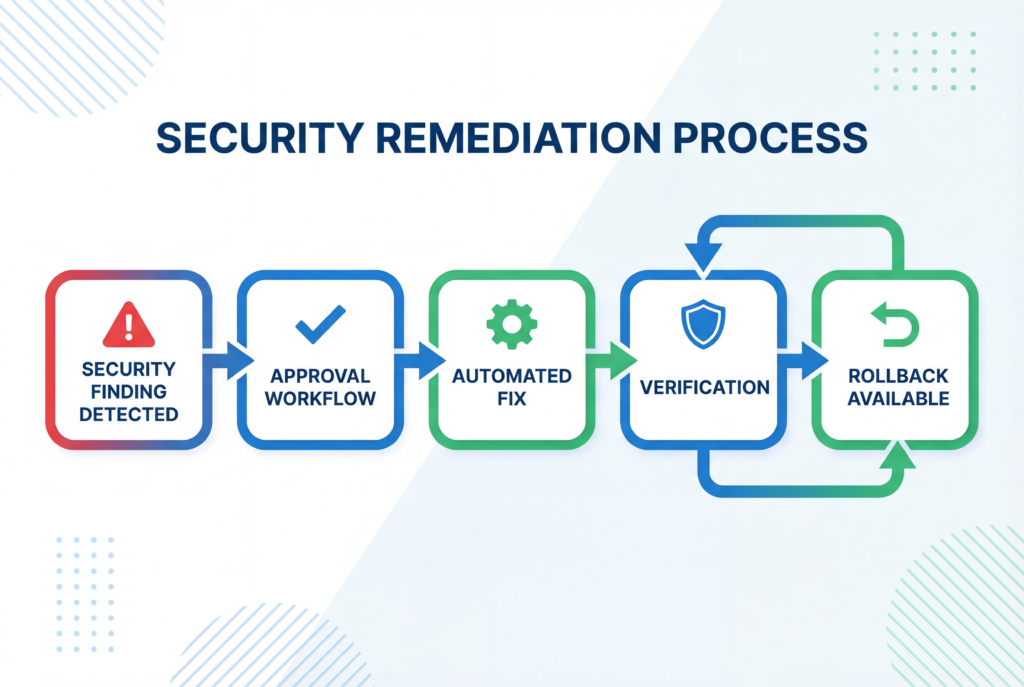
Security findings are only valuable if they’re acted upon. absecure’s automated remediation engine eliminates the gap between detection and resolution.
One-Click Fixes
Automated Remediation: Fix common misconfigurations automatically
Approval Workflows: Require approval for high-risk changes
Dry-Run Mode: Test remediations before applying them
60-Second Rollback: Automatic rollback within 60 seconds if issues are detected
Audit Trail: Complete audit log of all remediation actions
Supported Remediations
Close public S3 buckets and storage accounts
Enable encryption on databases and storage
Update security group rules
Patch vulnerable packages
Remove excessive IAM permissions
Rotate compromised credentials
And many more…
📋 Compliance Made Simple
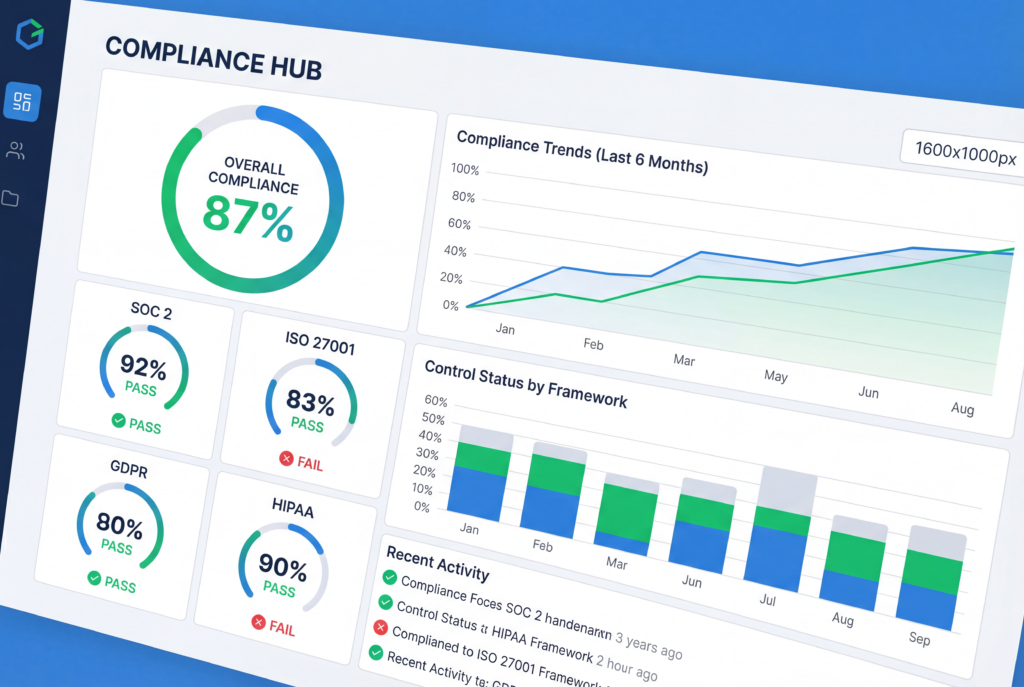
Compliance doesn’t have to be a nightmare. absecure automates compliance checking and reporting across six major frameworks:
Multi-Format Reports: Generate PDF, CSV, JSON, and HTML reports
Real-Time Dashboards: Live compliance scorecards
Control Mapping: Detailed evidence collection for each control
Historical Tracking: Track compliance trends over time
Automated Attestations: Generate compliance attestations for auditors
🧠 AI-Powered Threat Intelligence
absecure goes beyond traditional rule-based detection with advanced AI and machine learning capabilities:
Anomaly Detection
Behavioral Analysis: Identify unusual patterns in resource usage, access patterns, and network traffic
Zero-Day Detection: ML algorithms detect previously unknown attack patterns
Threat Correlation: Connect seemingly unrelated events to identify attack campaigns
Risk Prediction: Forecast potential security incidents before they occur
Advanced Analytics
Attack Path Analysis: Visualize potential attack paths through your infrastructure
Risk Quantification: Calculate breach probability and financial impact
ROI Analysis: Demonstrate the business value of security investments
Threat Prioritization: Focus on the risks that matter most
📊 Real-Time Security Dashboard
Get instant visibility into your security posture with our comprehensive dashboard:
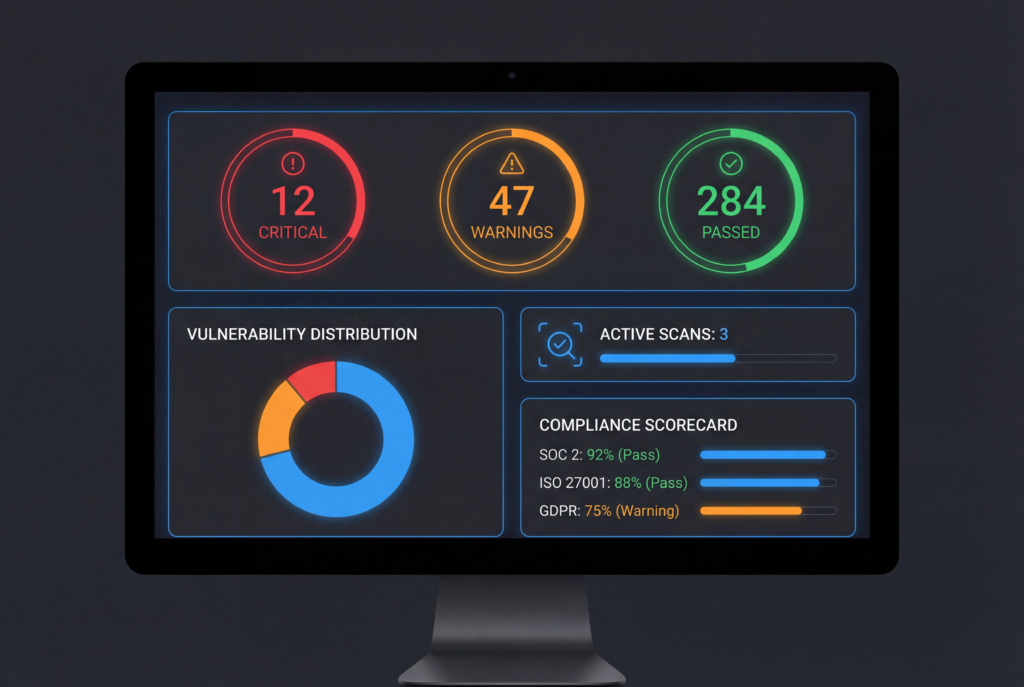
Modern security dashboard showing security metrics, vulnerability distribution, active scans, and compliance scorecard
Security Overview: High-level metrics and KPIs
Risk Distribution: Visual breakdown of vulnerabilities by severity
Active Scans: Monitor scan progress in real-time
Compliance Scorecard: Track compliance across all frameworks
Recent Findings: Latest security discoveries
Remediation Status: Track remediation progress
🚀 Get Started Today
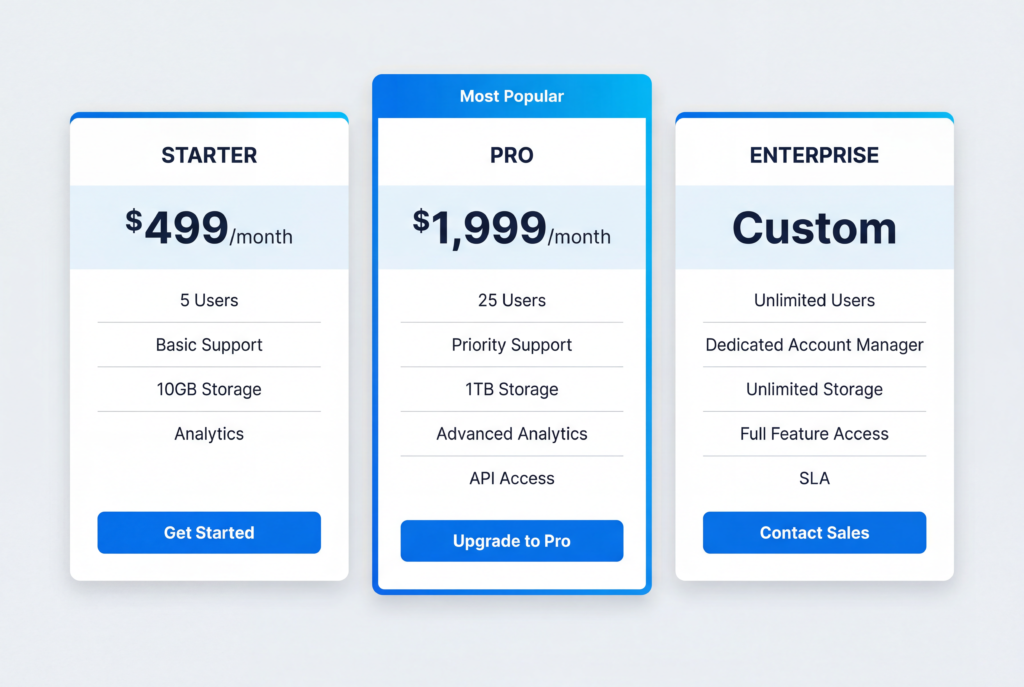
Ready to transform your cloud security? absecure offers flexible pricing to fit organizations of all sizes:
Starter Plan – $499/month
Up to 100 resources
Basic scanning capabilities
3 compliance frameworks
Email support
Pro Plan – $1,999/month
Up to 1,000 resources
Advanced AI/ML features
All 6 compliance frameworks
Priority support
Custom integrations
Enterprise Plan – Custom Pricing
Unlimited resources
All features included
Dedicated support
Custom SLA
On-premise deployment options
Start your free trial today and see how absecure can transform your cloud security posture.
🌟 Why Choose absecure?
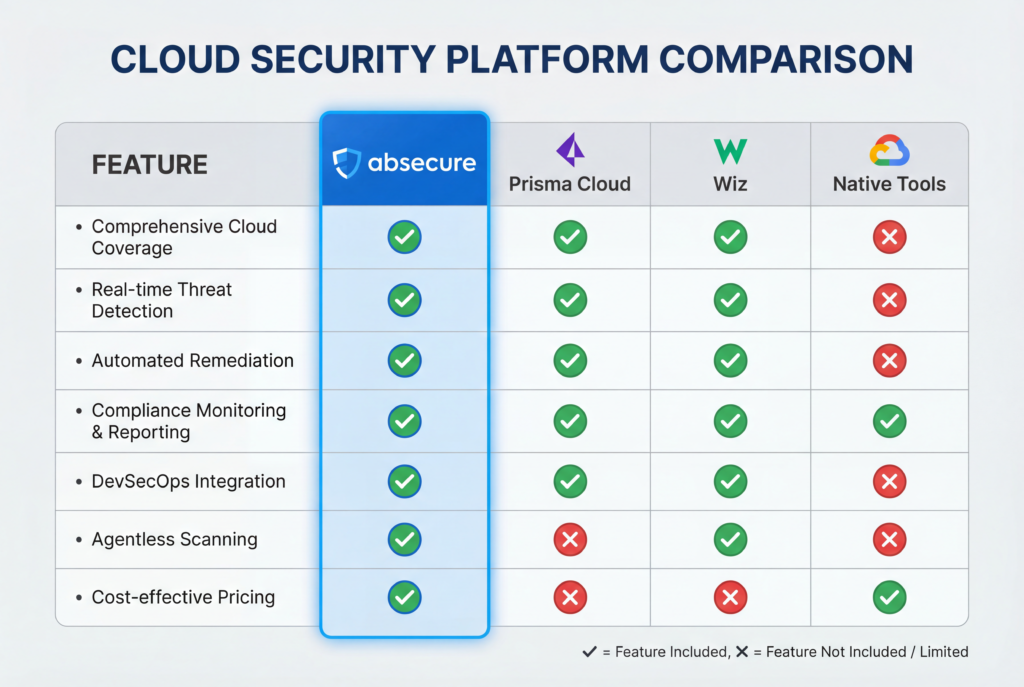
vs. Prisma Cloud
Transparent Pricing: No hidden costs or overpriced bundles
Better Multi-Cloud: True parity across all cloud providers
Easier to Use: Intuitive interface, faster time to value
vs. Wiz
Not AWS-First: Equal support for all cloud providers
Better Compliance: More comprehensive compliance coverage
More Affordable: Better value for mid-market organizations
vs. Native Cloud Tools
Unified Console: One tool for all clouds
Cross-Cloud Analysis: Identify risks across providers
Better Integration: Works with your existing tools
💡 Conclusion
The cloud security landscape is complex, but it doesn’t have to be overwhelming. With absecure, you get:
✅ Complete Visibility across all your cloud providers
✅ Automated Remediation to fix issues in seconds
✅ AI-Powered Detection to catch threats others miss
✅ Compliance Automation to reduce audit burden
✅ Unified Console to manage everything in one place
Don’t wait for a breach to happen. Start securing your multi-cloud infrastructure today with absecure.
absecure – Secure the Cloud, Simplify Security
About the Author
The absecure team consists of experienced cloud infrastructure engineers and security experts with 15+ years of combined experience. Our team includes former Azure and GCP security team members, successful cloud startup veterans, and published security researchers.
When Your CDN Fails: The Wake-Up Call Your Infrastructure Needs
7 Dec 2025
By Juan M
Technology
The Day Cloudflare Stopped
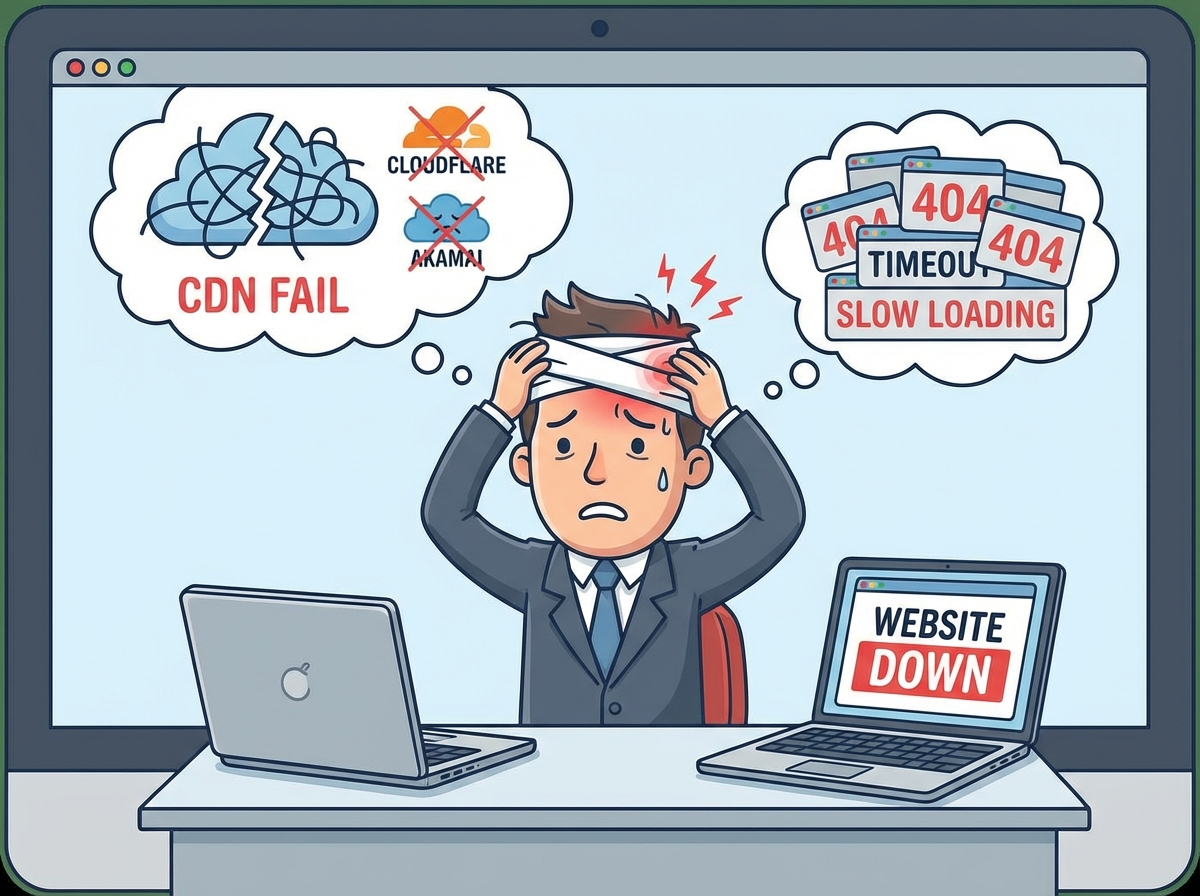
It happened twice in two weeks. On December 5th and again in late November 2025, Cloudflare—one of the world’s largest content delivery networks—experienced critical outages that briefly took portions of the internet offline. For millions of users, websites displayed error pages. For business owners, those minutes felt like hours. For engineering teams, it sparked an urgent question: Are we really protected if our CDN is our only shield?
The answer is uncomfortable: most companies are not.
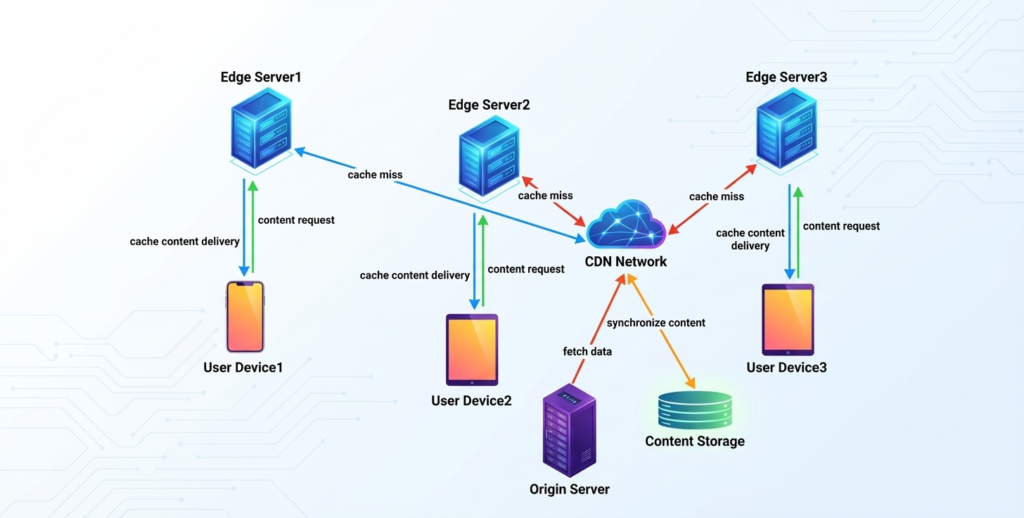
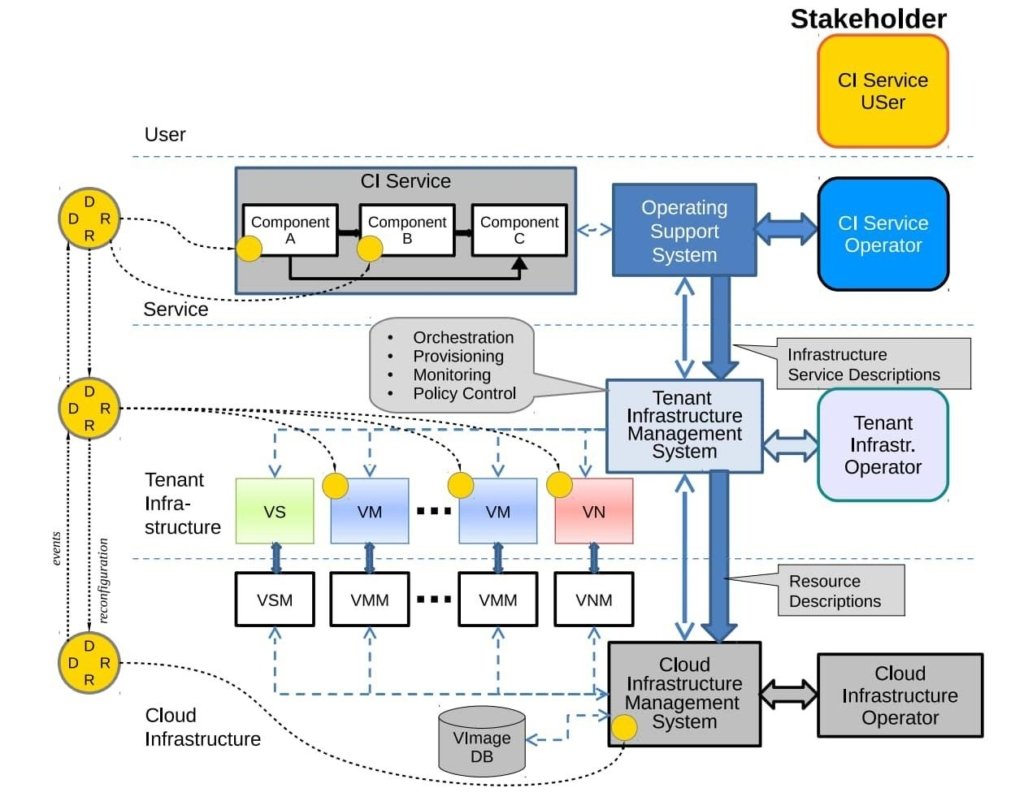
Figure 1: Traditional CDN architecture—single point of failure
If you operate a business whose entire web stack depends on a single CDN, this post is for you. We will walk through why single-CDN architectures are brittle at scale, and introduce two proven approaches to eliminate the risk: CDN bypass mechanisms and multi-CDN failover. By the end, you will understand how to design systems that keep serving your users even when a major vendor goes dark.
The Problem: Single Point of Failure at Global Scale
How a Single CDN Becomes Your Weakest Link
Most companies adopt a CDN for good reasons: faster content delivery, DDoS protection, global edge caching, and WAF (Web Application Firewall) services. The architecture looks simple and clean:
User → CDN → Origin Server
The CDN becomes the front door to everything. DNS resolves to the CDN’s IP addresses. The CDN caches static assets, forwards API traffic, and enforces security policies. The origin sits behind, protected from direct access.
This design works beautifully—until the CDN has a problem.
What Happened During the Outages
In both the November and December 2025 Cloudflare incidents, a configuration error or internal incident at Cloudflare’s control plane caused cascading failures across their global network. For affected customers, the symptoms were clear:
All traffic to Cloudflare-fronted services returned 5xx errors
DNS queries continued to resolve, but reached an unreachable service
Origin servers remained healthy and online, but were invisible to end users because all paths led through the CDN
Workarounds required manual intervention—logging into the CDN dashboard (if reachable), changing DNS, or calling support during an outage
The irony is sharp: the infrastructure designed to provide high availability became the source of unavailability.
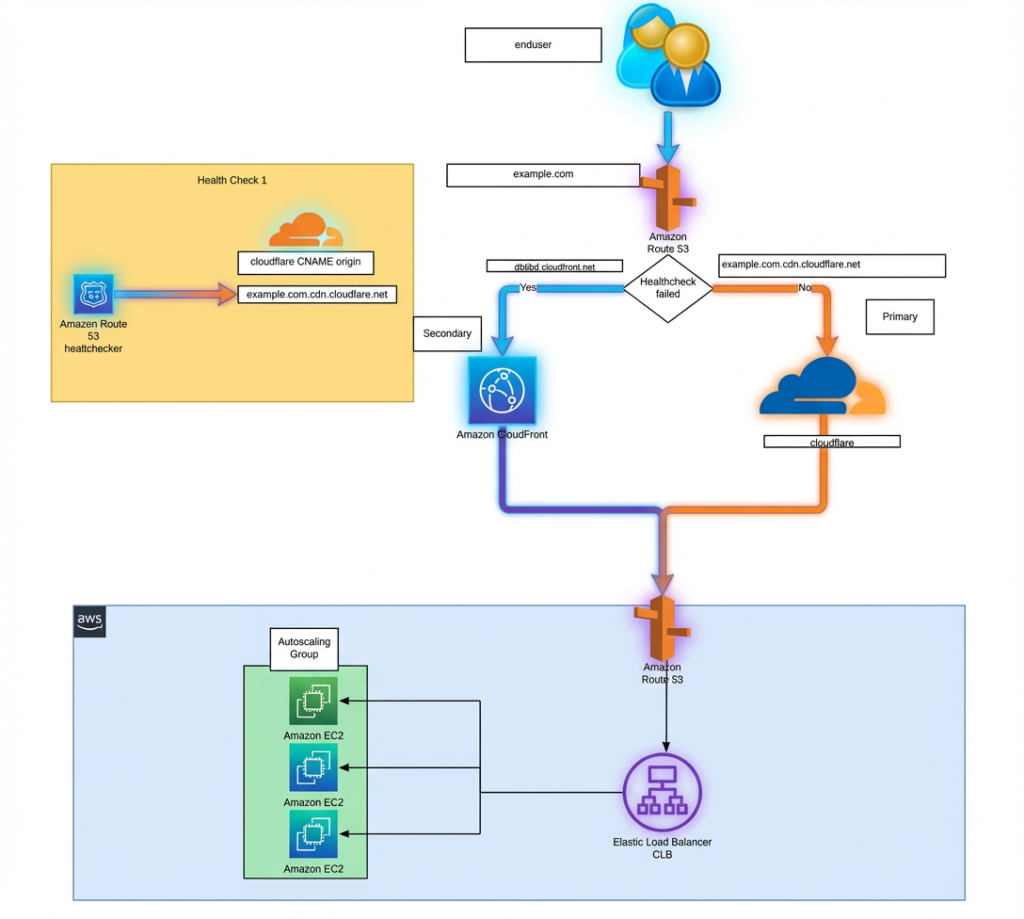
Figure 2: Multi-CDN failover strategy—removes single point of failure
The Business Impact
For a SaaS company with $100k monthly revenue, even 15 minutes of CDN-induced downtime can mean:
Potential SLA breaches and compensation obligations
Reputational damage in competitive markets
For fintech, healthcare, and e-commerce, the costs are exponentially higher. And yet, many teams assume “the CDN vendor will not fail” because they have redundancy internally.
They do. But you depend on them all the same.
Solution 1: CDN Bypass—The Emergency Exit
Why Bypass Matters
A CDN bypass is not about abandoning your primary CDN during normal operations. Instead, it is a controlled, secure pathway to your origin server that activates only when the CDN itself becomes the problem.
Think of it like a fire exit: you do not walk through it every day, but it saves lives when the main entrance is blocked.
How CDN Bypass Works
The architecture operates in layers:
Layer 1: Health Monitoring Continuous health checks on your primary CDN—latency, error rate, reachability, and geographic coverage. If thresholds are breached (e.g., 5% of regions report 5xx errors or p95 latency > 2 seconds), an alert is triggered and bypass logic is engaged.
Layer 2: Dual Routing You maintain two DNS records:
Primary: Points to your CDN (used under normal conditions)
Secondary / Bypass: Points to your origin or a hardened entry point (activated only on CDN failure)
Switching between them is automated—no manual DNS editing during an incident.
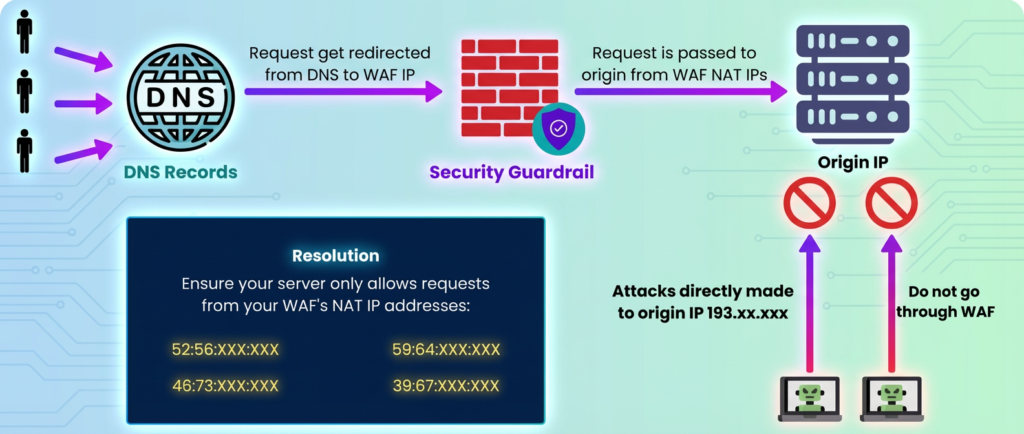
Layer 3: Origin Hardening Direct access to your origin is dangerous if uncontrolled. You must protect it with:
IP Allow-lists: Only accept requests from your bypass management service or approved monitoring endpoints
VPN / Private Connectivity: Route bypass traffic through a secure tunnel (e.g., AWS PrivateLink, Azure Private Link)
WAF and Rate Limiting: Apply the same security policies you had at the CDN to the direct path
Header Validation: Ensure only traffic from your bypass orchestration layer is accepted
Layer 4: Gradual Traffic Shift Once bypass is active, traffic does not all migrate at once. Instead:
Begin with 5-10% of traffic on the direct path
Monitor for errors and latency
Ramp up to 100% over 5-10 minutes
If issues arise, revert to CDN automatically
Figure 3: Origin server protection during bypass mode
The Bypass Playbook
A well-designed bypass system includes:
Automated Detection: Monitor CDN health continuously; do not wait for customer complaints
Runbook Automation: Execute failover logic without human intervention—speed is critical
Graceful Degradation: Bypass mode may not include all CDN features (like edge caching). Accept lower performance to avoid complete outage
Recovery and Rollback: Once the CDN recovers, automatically shift traffic back after a safety window
Incident Logging: Record what happened, when, and why for post-incident review
Who Should Use Bypass?
Bypass is ideal for:
E-commerce platforms, SaaS applications, and marketplaces where every minute of downtime is quantifiable revenue loss
Services with strict SLAs or compliance requirements (fintech, healthcare)
Teams with engineering capacity to operate a secondary resilience layer
Businesses that can tolerate reduced performance (no edge caching, longer latency) for short periods to stay online
It is not a replacement for a good CDN, but a safety net when your primary CDN fails.
Solution 2: Multi-CDN with Intelligent Failover
Moving Beyond Single-Vendor Lock-In
While CDN bypass solves the immediate problem, a more comprehensive approach is to distribute load across multiple CDN providers. This removes the single point of failure entirely and offers additional benefits: better performance, cost negotiation, and the ability to choose the best CDN for each use case.
Multi-CDN Architecture
In a multi-CDN setup, traffic is shared between two or more independent CDN providers:
Secondary CDN: Another global provider with complementary strengths — handles 30-40% of traffic
Routing Layer: DNS-based or HTTP-based intelligent routing that steers traffic based on real-time metrics
Figure 4: Network resilience with multi-CDN anomaly detection
How Intelligent Routing Works
Instead of static 50/50 load balancing, smart routing adjusts in real time:
Real-Time Metrics:
Latency: Route users to the CDN with lower p95 latency in their region
Error Rate: If one CDN returns 5xx errors >1%, shift traffic away automatically
Cache Hit Ratio: Some CDNs cache better for your content type; route accordingly
Regional Availability: If a CDN loses an entire region, route around it
Routing Methods:
DNS-Level (GeoDNS): Return different CDN A records based on user geography and health checks. Simplest but less granular
HTTP-Level (Application Layer): A small proxy or load balancer sits before both CDNs, making per-request decisions. More powerful but adds latency
Dedicated Multi-CDN Platforms: Third-party services (IO River, Cedexis, Intelligent CDN) manage routing and billing across multiple CDNs as a managed service
Practical Setup Example
DNS Query: cdn.example.com ↓ Resolver checks health of both CDNs ↓ CDN-A: Latency 50ms, Error Rate 0.1%, Status OK CDN-B: Latency 120ms, Error Rate 0.2%, Status OK ↓ Decision: Route to CDN-A ↓ User downloads content from CDN-A at 50ms
If CDN-A later spikes to 2% error rate:
Next query routes to CDN-B instead Existing connections may drain gracefully Traffic rebalances to healthy provider
Cache Warm-up and Cold Starts
One challenge with multi-CDN is that both CDNs must be warmed with your content. If you only route 30% of traffic to CDN-B, it will have more cache misses and higher latency to origin during the failover period.
Solutions:
Dual Caching: Proactively push your most critical assets to both CDNs daily
Warm Traffic: Send a small amount of traffic (10-20%) to the secondary CDN constantly to keep cache warm
Keep-Alive Connections: Maintain a baseline of requests to the secondary CDN even if not actively used
Unified Security and Configuration
For multi-CDN to work without surprising users, security policies must be consistent across both providers:
SSL/TLS Certificates: Same domain, same cert on both CDNs
WAF Rules: Mirror your DDoS and WAF policies between providers. A bypass to CDN-B should not have weaker protection
Cache Headers and Directives: Both CDNs should honor the same TTL and cache rules
Custom Headers and Transformations: If you inject headers or modify responses, do it consistently
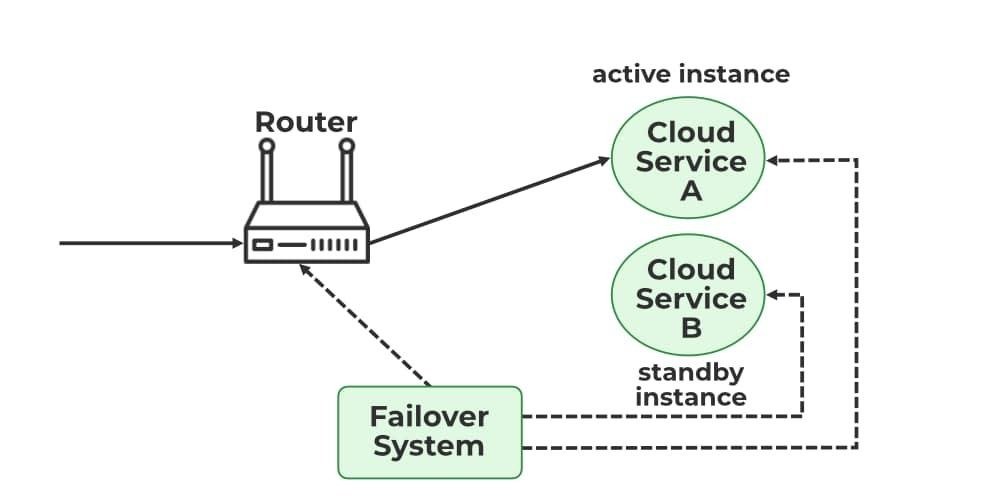
Figure 5: Failover system in cloud—automatic traffic rerouting
Who Should Use Multi-CDN?
Multi-CDN is ideal for:
Large enterprises serving global traffic where downtime has severe financial impact
Companies with high volumes that can negotiate favorable rates with multiple providers
Organizations that want to avoid vendor lock-in and maintain negotiating leverage
Businesses with diverse content types (streaming, APIs, static, dynamic) that benefit from specialized CDNs
Multi-CDN is more complex than single-CDN, but also more resilient and often cost-effective at scale.
Comparison: Single CDN, Bypass, and Multi-CDN
Aspect
Single CDN Only
CDN + Bypass
Multi-CDN
Availability During CDN Outage
High downtime risk
Critical paths online
Auto-rerouted
Setup Complexity
Low
Medium
High
Operational Overhead
Low
Medium
Medium-High
Cost
$$
$$$
$$$-$$$$
Performance (Normal State)
High
High
High (optimized)
Performance (Bypass/Failover)
N/A
Reduced (no edge cache)
Maintained
Security Consistency
Vendor-managed
Manual hardening needed
Must be unified
Time to Restore Service
Minutes to hours
Seconds (automatic)
Milliseconds (automatic)
Vendor Lock-In Risk
High
Medium
Low
Table 1: Table 1: Comparison of CDN resilience strategies
Designing for Your Organization
Assessment Questions
Before choosing bypass, multi-CDN, or both, ask yourself:
What is the cost of 1 hour of downtime? If it exceeds $10k, invest in resilience now.
Do we have geographic concentration risk? If most users are in one region where one CDN has weak coverage, diversify.
What is our incident response capability? Bypass requires automated systems; multi-CDN requires sophisticated routing. Do we have the team?
Is vendor lock-in a concern? If yes, multi-CDN reduces risk.
What is our compliance posture? Some industries require redundancy by regulation. Build it in from the start.
Phased Implementation Roadmap
Phase 1 (Weeks 1-4): Foundation
Audit current CDN configuration and dependencies
Identify critical user journeys (auth, checkout, APIs)
Design origin hardening and bypass playbooks
Set up continuous health monitoring
Phase 2 (Weeks 5-8): Bypass Ready
Implement health checks and alerting
Build DNS failover automation
Harden origin server access controls
Test bypass in staging; verify automatic recovery
Phase 3 (Weeks 9-12): Multi-CDN (Optional)
Onboard secondary CDN provider
Replicate security and cache configuration
Deploy intelligent routing layer
Gradual traffic shift and optimization
Each phase is low-risk if executed in staging first.
The Role of Managed Services
Building and operating these resilience layers yourself is possible but demanding. It requires:
Deep DNS and networking expertise
Continuous monitoring and alerting systems
Incident response runbooks and automation
Compliance and audit trails
24/7 on-call coverage for failover management
This is where specialized vendors and managed services add value. Services like AutoMi Cloud AI help engineering teams:
Design resilient CDN architectures tailored to your traffic patterns and risk tolerance
Implement automated bypass and multi-CDN routing without reinventing the wheel
Operate these systems with 24/7 monitoring, alerting, and runbook execution
Optimize performance and cost by continuously tuning routing policies and cache behavior
Certify compliance and SLA adherence through detailed incident logging and remediation
A managed CDN resilience service typically pays for itself within one incident cycle by preventing revenue loss and reducing engineering overhead.
Next Steps: Start Your Assessment
The Cloudflare outages of November and December 2025 are not anomalies—they are signals that single-CDN dependency is a business risk, not a technical oversight.
You can take action today:
Run a scenario test: Imagine your primary CDN goes offline right now. Could your engineering team route traffic to an alternate path in under 5 minutes? If not, you have a gap.
Calculate your downtime cost: Quantify what one hour of unavailability means to your business in lost revenue, SLA penalties, and reputational damage.
Engage a resilience partner: Schedule a consultation to walk through bypass and multi-CDN options tailored to your infrastructure and risk profile.
We offer a free CDN Resilience Assessment where we review your current architecture, simulate a CDN failure, quantify business impact, and outline a concrete 12-week roadmap to eliminate single points of failure.
No vendor lock-in. No long contracts. Just pragmatic engineering that keeps your services online.
Mastering Financial Efficiency in Enterprise Analytics Platform
Digital transformation means using new technology to improve how a business works. Many companies want to use strong data tools to make better decisions, but they also need to watch their spending carefully. Modern data platforms bring together many important tools for handling data, like collecting, storing, and analyzing it, all in one place. This makes work easier and faster.
However, if companies don’t manage their costs well, they might end up with very high bills and waste resources. This happens because moving from old systems to cloud-based platforms changes how costs work. Modern analytics platforms use a pricing system based on the amount of capacity a company uses, which includes things like storage and extra usage spikes.
To avoid spending too much, businesses need to learn smart ways to control these costs. This guide explains useful strategies and real examples that have helped companies reduce their expenses by more than half while still keeping their systems running efficiently. By understanding how to use your analytics platform’s pricing and features wisely, companies can get the best value without overspending.
Figure 1: Analytics Platform Cost Optimization Dashboard with Real-Time Monitoring
Why Strategic Cost Optimization Matters
Financial Predictability: Structured cost management transforms variable cloud spending into predictable operational expenses aligned with business objectives.
Resource Efficiency: Proper optimization eliminates waste from idle resources, oversized capacities, and inefficient workload patterns.
Competitive Advantage: Organizations with optimized deployments can reinvest savings into innovation and business growth initiatives.
Scalability Foundation: Cost-conscious architectures provide sustainable frameworks for expanding analytics capabilities without exponential cost increases.
Understanding the Analytics Platform Cost Architecture
Modern analytics platforms use a simple way to charge money called capacity-based pricing. Instead of charging separately for each service, they use something called Capacity Units (CUs) to combine the cost of many services like data processing, analytics, and storage. This makes billing easier and helps save money by sharing resources.
There are two main ways to pay for analytics services. The first is Pay-as-you-go (PAYG), where you only pay for what you use. This is good if your use changes a lot. The second way is Reserved Capacity, where you pay in advance for a set amount of use, which can save about 40% if you know how much you will use. Knowing these options helps people or companies choose the best way to pay that fits their needs and budget.
Figure 2: Pricing Models and Capacity Tier Comparison with Cost Savings Analysis
Capacity Tier Structure
Analytics platforms provide different types of computing power called SKUs, which help businesses run their work smoothly. These SKUs start from lower tiers with minimal computing units and go all the way up to enterprise tiers with thousands of computing units. This means companies can choose just the right amount of power they need, whether they are small or very large. The more computing units they pick, the more power they get, but the price also goes up. This way, businesses only pay for what they really need, making it easier and more affordable to handle their work.
Core Cost Optimization Strategies
Figure 3: Six Core Cost Optimization Strategies for Analytics Platforms
Strategy 1: Right-sizing Capacity Tiers
This strategy helps to save money right away by making sure the resources used fit the actual needs. However, it needs constant watching to avoid problems when demand suddenly increases. Companies should keep an eye on how much capacity is being used and change their resource choices as needed to keep things running smoothly.
Strategy 2: Reserved Capacity vs Pay-as-you-go Analysis
Reserved capacity and Pay-As-You-Go (PAYG) are two ways companies pay for computing resources. Reserved capacity means paying in advance for a certain number of resources. It is cheaper, saving about 40% compared to PAYG, but it works best only if the company knows exactly how much it will use. PAYG is more flexible because companies pay only for what they use, making it good for unpredictable or changing needs.
To choose the best option, companies need to study how much they use their resources over time. If they use more than 60-70% of the reserved amount, they save money by choosing reserved capacity. But if usage changes a lot, PAYG might be better because it avoids paying for unused resources. The decision depends on the company’s usage patterns, budget goals, and how much risk they are willing to take. In short, understanding how much and how often resources are needed helps companies pick the right payment plan and save money.
Strategy 3: Auto-pause and Scheduling
Auto-pause features help stop charges when a service or system is not being used, so companies do not pay for inactive time. However, these features need to be set up carefully. If not done properly, they might interrupt important business tasks. To avoid problems, companies should use smart plans that think about how different parts of the business depend on each other and when people need to use the system. This way, billing stops only when it is safe, and work can continue without any issues.
Strategy 4: Workload Consolidation
Combining different tasks onto fewer resources helps save capacity and use resources more efficiently. However, it needs to be managed carefully so that tasks don’t slow each other down when running at the same time. To make it work well, one must understand how each task behaves, when it runs, and how much resources it uses.
Strategy 5: Data Lifecycle Management
Data storage helps save money, especially when you are working with a lot of data. To reduce costs, companies can use automatic rules that move data to cheaper or faster storage, depending on how often the data is used. By managing data properly, companies can get a good balance between cost and performance.
Strategy 6: Query Tuning and Performance Optimization
Smart query optimization helps reduce computer usage by 25–40%. It does this by automatically checking performance and improving how tasks are carried out. The main methods used are choosing the right indexes, rewriting queries in a better way, and using resources more effectively.
Enterprise Security & Data Protection
Why Security Enables Cost Optimization
Robust security frameworks prevent costly data breaches while enabling efficient resource sharing and governance that supports cost optimization initiatives.
Critical Security Controls
1. Identity & Access Management
Integrate with Active Directory for unified identity management
Implement role-based access control (RBAC) to ensure least-privilege access principles
Deploy conditional access policies to secure access while enabling cost-effective resource sharing 2. Network Protection
Configure Virtual Network integration for secure, cost-efficient data transfer
Implement private endpoints to reduce data egress charges
Deploy network security groups to control traffic flow and prevent unauthorized access
3. Data Encryption
Enable customer-managed keys through security vaults for enhanced security posture
Implement encryption in transit and at rest without performance penalties
Automate key rotation to maintain security without operational overhead
4. Monitoring & Compliance
Deploy comprehensive logging for cost allocation and security monitoring
Implement automated compliance checking to prevent expensive regulatory violations
Use unified audit trails for both security and cost governance
Enterprise Cost Optimization Features
Advanced analytics platforms offer cutting-edge cost optimization capabilities that extend far beyond traditional analytics solutions. These comprehensive approaches transform platforms from capable tools into strategic business assets that drive both operational efficiency and financial excellence.
Key Optimization Capabilities:
Advanced Right-sizing Intelligence: Proprietary algorithms analyze workload patterns across multiple dimensions, automatically recommending optimal capacity tiers that reduce costs by up to 35% while maintaining performance SLAs through intelligent predictive scaling.
Revolutionary Reserved Capacity Analytics: Sophisticated pricing analysis engines evaluate historical usage patterns and future projections to optimize the balance between reserved capacity commitments and pay-as-you-go flexibility, typically achieving 45-55% cost savings versus standard approaches.
Intelligent Auto-pause and Scheduling: Machine learning-powered scheduling systems learn organizational patterns and automatically manage capacity states, eliminating up to 60% of idle resource costs while ensuring availability during critical business operations.
Advanced Workload Consolidation Platform: Patented workload orchestration technology optimizes resource utilization across tenants and workspaces, achieving consolidation ratios of 3:1 or higher while maintaining isolation and performance guarantees.
Revolutionary Data Lifecycle Intelligence: Data lifecycle management systems employ AI-driven classification and automated tiering policies, reducing storage costs by 40-70% through intelligent data movement and retention optimization.
Precision Query Optimization Engine: Advanced query analysis and tuning capabilities automatically identify and resolve performance bottlenecks, reducing compute consumption by 25-40% through intelligent query rewriting and execution plan optimization.
Comprehensive Cost Monitoring and Alerting: Real-time financial intelligence platforms provide granular cost tracking, predictive budget alerts, and automated anomaly detection with integrated dashboards for complete financial visibility.
Dynamic Elastic Bursting Management: Intelligent bursting strategies handle peak workloads through predictive scaling algorithms that prevent overspending while ensuring performance, typically reducing burst-related costs by 30-50% compared to reactive approaches.
Enterprise FinOps Enablement Framework: Comprehensive FinOps platforms promote cross-team financial accountability through automated cost allocation, detailed chargeback systems, and collaborative governance workflows that align technical decisions with business objectives.
1. Comprehensive Analysis: Implemented right-sizing analytics, discovering 60% of mid-tier capacities could optimize to lower tiers without performance impact
2. Strategic Pricing Optimization: Transitioned 70% of workloads to Reserved capacity achieving 40% base cost reduction
3. Intelligent Automation: Deployed auto-pause for development environments with business-hours-aware scheduling 4. Workload Consolidation: Merged departmental workspaces onto shared capacities with intelligent scheduling
5. Data Lifecycle Management: Implemented automated tiering policies for historical data optimization
The Results
Metric
Before
After
Improvement
Monthly Platform Cost
$50,000
$18,000
-64%
Capacity Utilization
35%
78%
+123%
Active Users
1,200
1,680
+40%
Query Performance
12.5s
9.4s
+25%
Admin Hours per Week
25
5
-80%
Essential Tools & Techniques
Platform Metrics Applications: Comprehensive monitoring for usage patterns and cost allocation Cloud Cost Management: Native integration for budget monitoring and automated anomaly detection Automation Workflows: Automated workflow orchestration for intelligent capacity management Advanced Analytics Dashboards: Advanced analytics for real-time cost monitoring
Cloud Monitoring: Comprehensive alerting infrastructure for proactive cost control
How to Choose Your Optimization Path
Select strategies based on organizational factors:
Right-sizing Capacity Tiers: Well-defined workload patterns seeking immediate cost reduction Reserved Capacity Analysis: Stable workloads benefiting from 40% savings through commitment pricing Auto-pause and Scheduling: Development teams with distinct business hours requiring automation Workload Consolidation: Multiple departments seeking improved resource utilization
Data Lifecycle Management: Data-intensive organizations requiring strategic storage optimization
Conclusion
By implementing these comprehensive cost optimization strategies, organizations achieve substantial cost reductions while maintaining peak performance. GlobalTech’s transformation demonstrates that strategic cost management transforms analytics platforms from expense centers into strategic business assets driving both innovation and financial efficiency.
Ready to optimize your analytics platform costs? Contact our specialists for a complimentary assessment and customized optimization roadmap.
Your path to financial excellence and operational efficiency starts today.
Azure Cloud Adoption Framework: A Structured Approach to Cloud Success
9 Nov 2025
By Juan M
Cloud
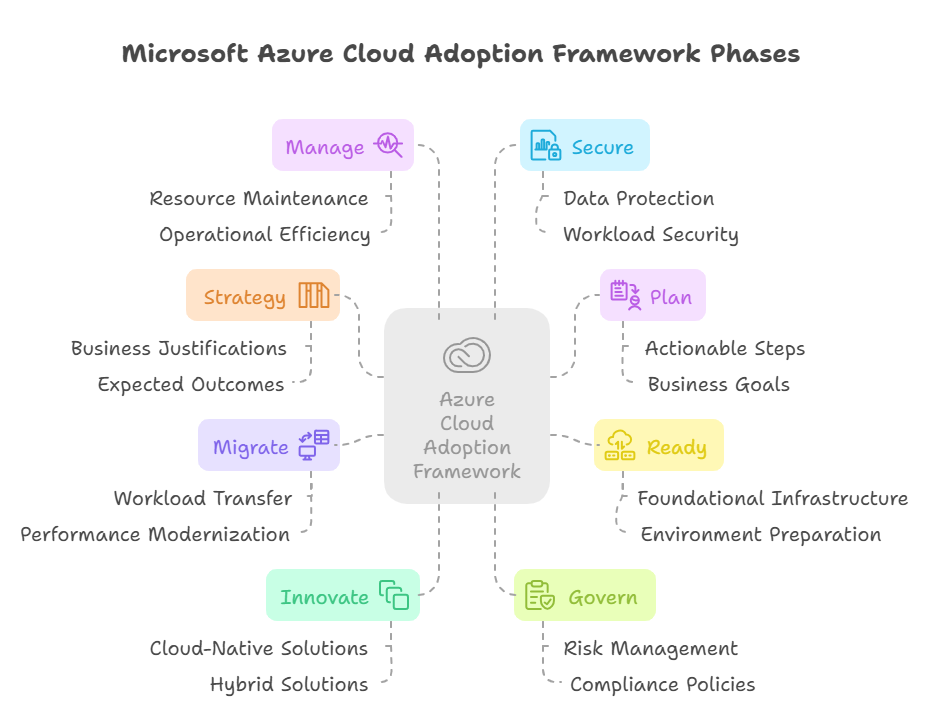
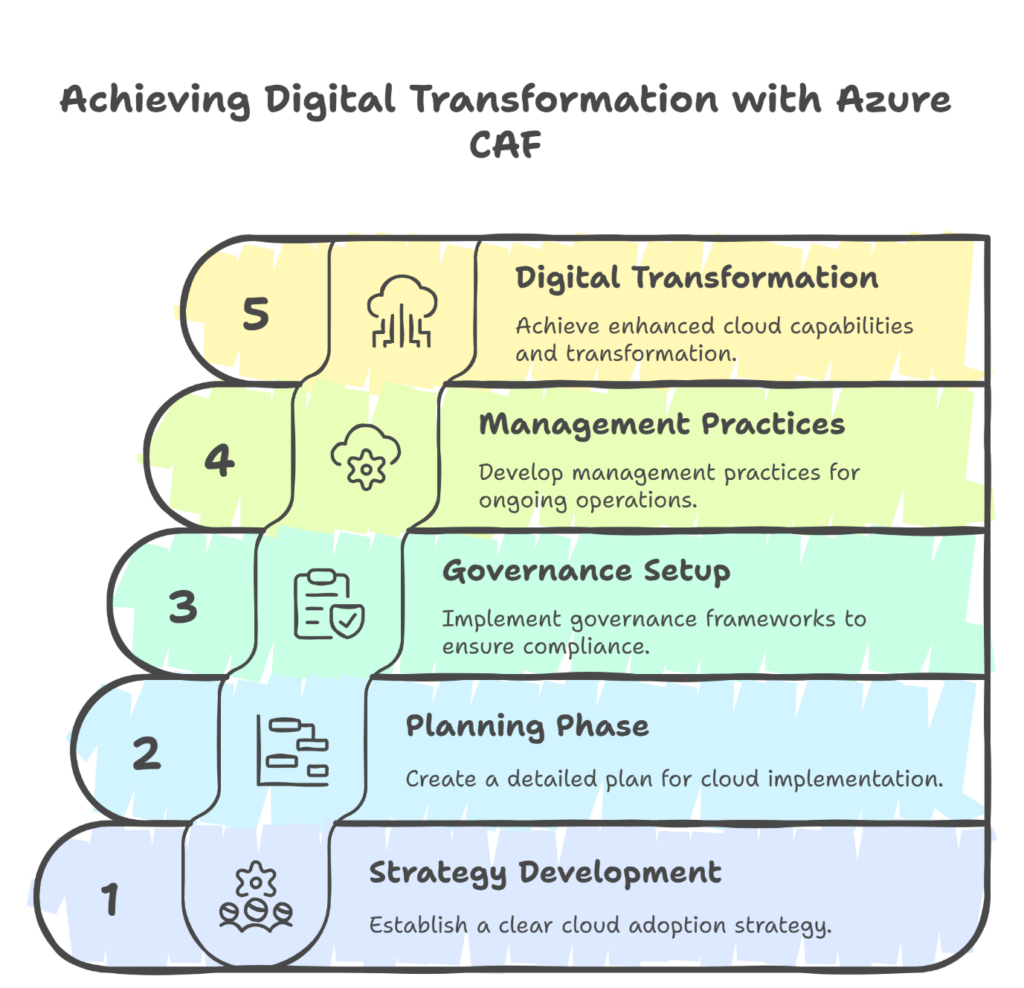
The Microsoft Azure Cloud Adoption Framework (CAF) is a comprehensive methodology designed to guide organizations through their cloud adoption journey. It encompasses best practices, tools, and documentation to align business and technical strategies, ensuring seamless migration and innovation in the cloud. The framework is structured into eight interconnected phases: Strategy, Plan, Ready, Migrate, Innovate, Govern, Manage, and Secure. Each phase addresses specific aspects of cloud adoption, enabling organizations to achieve their desired business outcomes effectively.
The Strategy phase focuses on defining business justifications and expected outcomes for cloud adoption. In the Plan phase, actionable steps are aligned with business goals. The Ready phase ensures that the cloud environment is prepared for planned changes by setting up foundational infrastructure. The Migrate phase involves transferring workloads to Azure while modernizing them for optimal performance.
Innovation is at the heart of the Innovate phase, where organizations develop new cloud-native or hybrid solutions. The Govern phase establishes guardrails to manage risks and ensure compliance with organizational policies. The Manage phase focuses on operational excellence by maintaining cloud resources efficiently. Finally, the Secure phase emphasizes enhancing security measures to protect data and workloads over time.
This structured approach empowers organizations to navigate the complexities of cloud adoption while maximizing their Azure investments. The Azure CAF is suitable for businesses at any stage of their cloud journey, providing a robust roadmap for achieving scalability, efficiency, and innovation.
Below is a visual representation of the Azure Cloud Adoption Framework lifecycle:
The diagram illustrates the eight phases of the framework as a continuous cycle, emphasizing their interconnectivity and iterative nature. By following this proven methodology, organizations can confidently adopt Azure’s capabilities to drive business transformation.
What is Azure Cloud Adoption Framework (CAF):
The Azure Cloud Adoption Framework (CAF) is a comprehensive, industry-recognized methodology developed by Microsoft to streamline an organization’s journey to the cloud. It provides a structured approach, combining best practices, tools, and documentation to help organizations align their business and technical strategies while adopting Azure cloud services. The framework is designed to address every phase of the cloud adoption lifecycle, including strategy, planning, readiness, migration, innovation, governance, management, and security.
CAF enables businesses to define clear goals for cloud adoption, mitigate risks, optimize costs, and ensure compliance with organizational policies. By offering actionable guidance and templates such as governance benchmarks and architecture reviews, it simplifies the complexities of cloud adoption.
How Can Azure CAF Help Companies
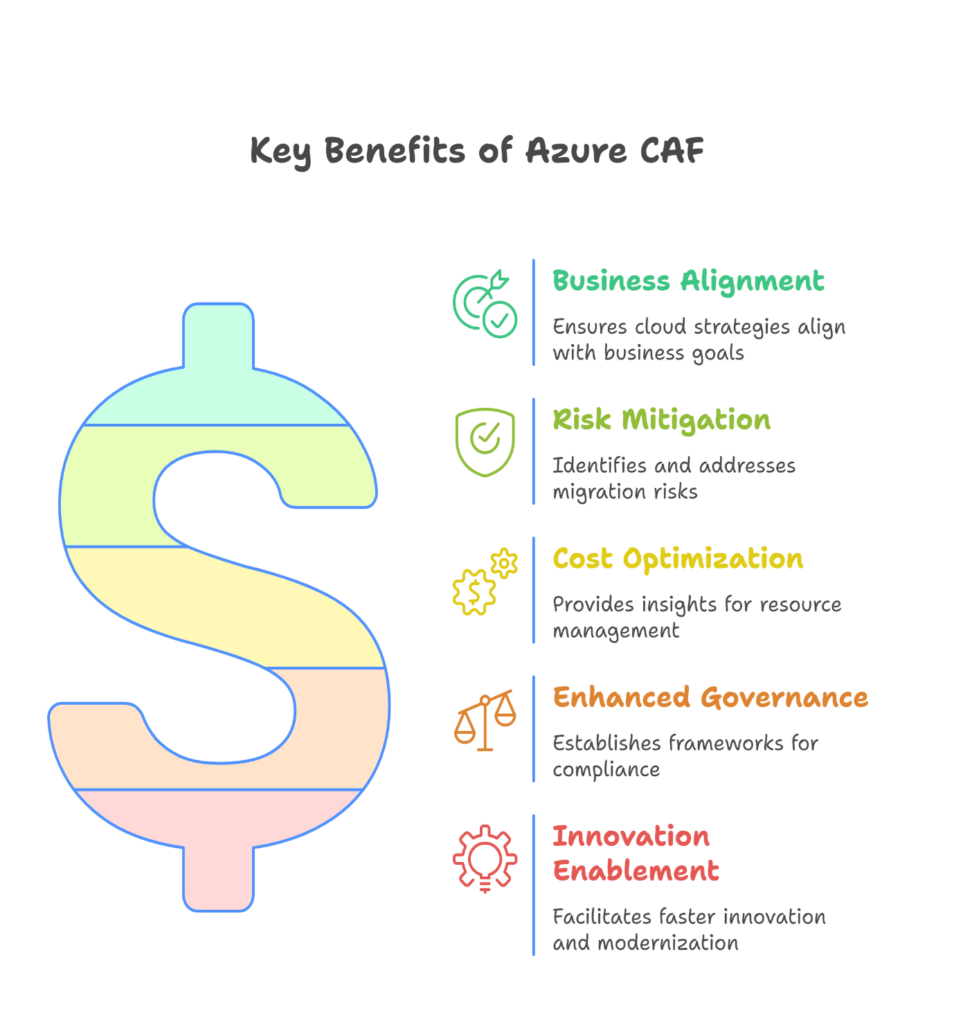
Azure CAF provides several key benefits to organizations:
Business Alignment: It ensures that cloud adoption strategies are aligned with broader business objectives for long-term success.
Risk Mitigation: The framework includes tools and methodologies to identify and address potential risks during the migration process.
Cost Optimization: CAF offers insights into resource management and cost control to prevent overspending on cloud services.
Enhanced Governance: It establishes robust governance frameworks to maintain compliance and operational integrity.
Innovation Enablement: By leveraging cloud-native technologies, companies can innovate faster and modernize their IT infrastructure effectively.
How AUTOMICLOUDAI(AMCA) Can Help You Onboard to Azure CAF
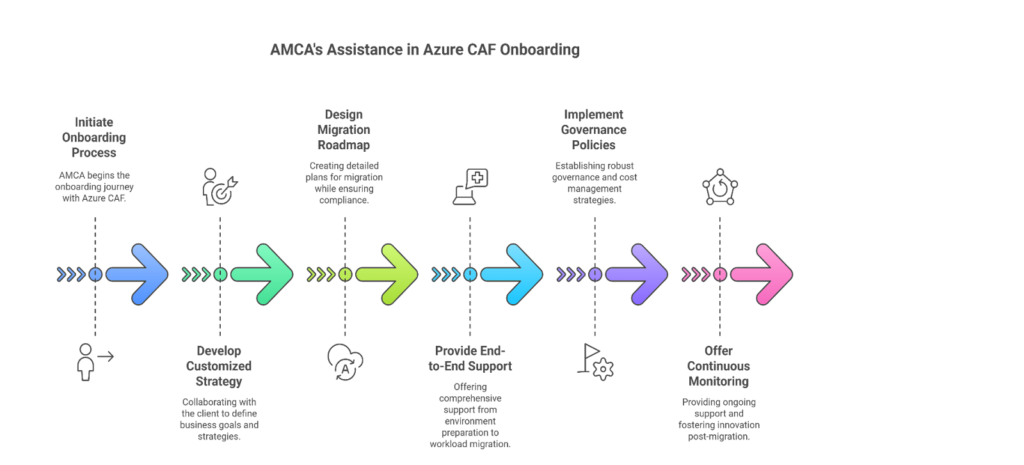
At AMCA, we specialize in making your transition to Azure seamless by leveraging the Azure Cloud Adoption Framework. Here’s how we can assist:
Customized Strategy Development: We work with your team to define clear business goals and create a tailored cloud adoption strategy.
Comprehensive Planning: Our experts design detailed migration roadmaps while addressing compliance and security requirements.
End-to-End Support: From preparing your environment to migrating workloads and optimizing operations, we ensure a smooth transition.
Governance & Cost Management: We implement robust governance policies and provide cost optimization strategies for efficient resource utilization.
Continuous Monitoring & Innovation: Post-migration, AMCA offers ongoing support to manage workloads and foster innovation using Azure’s advanced capabilities.
With AMCA as your partner, you can confidently adopt Azure CAF while minimizing risks and maximizing returns on your cloud investment. Let us guide you through every step of your cloud journey.